
When you’re building process automation, hitting a wall when the platform’s interface components don’t match what your users actually need is a pretty common frustration. You end up forcing square pegs into round holes — or worse, abandoning automation projects because the forms can’t deliver the experience your business requires.
Nintex K2 release 5.9 changes this dynamic. This latest release lets you create custom interface controls that solve your specific problems, ensure everyone can use your applications regardless of ability, and migrate legacy workflows without starting from scratch.
With Nintex K2 release 5.9, you can …
Stop settling for generic and boring forms to kick off your workflows
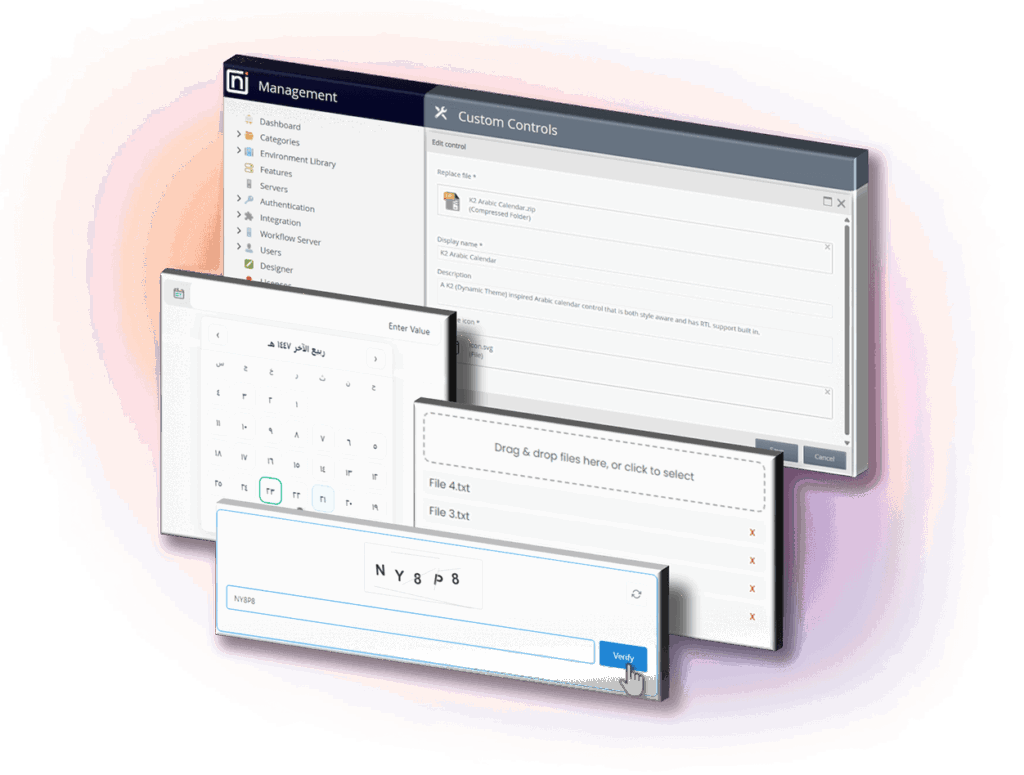
Most automation platforms give you a fixed set of form controls. When you need something different — like CAPTCHA for bot protection, culturally appropriate calendar displays, or modern drag-and-drop file handling — you’re stuck. You either hack workarounds with custom JavaScript (breaking security policies), build completely custom applications outside the platform (losing workflow integration), or tell users ”the system can’t do that.”
K2’s custom control framework treats extensibility as a core capability. You build JavaScript-based controls that match your exact requirements, add them centrally, and they appear in the designer toolbox for anyone to use. Developers create purpose-built components once, business analysts deploy them repeatedly without touching code.
Interface problems kill automation adoption. When forms don’t work the way users expect, they abandon processes or work around the system. When you build controls that match actual workflows, adoption increases and processes get completed.
We’re launching with three controls in the Nintex Gallery:
- CAPTCHA without JavaScript injection
- An Arabic calendar with full date compatibility
- Drag-and-drop file uploads.
We will be adding even more controls in the coming months, so check back often. But you’re not limited to our roadmap. If your business needs something specific, you can create it.

Meet accessibility standards with ease
For many organizations, especially in government, financial services, and healthcare, accessibility is a non-negotiable requirement. Government regulations in the US and EU require accessible public-facing applications. Financial services, healthcare, and manufacturing companies with government contracts face the same mandates. Beyond compliance, building applications that exclude users with disabilities means you’re leaving people behind … and potentially exposing your organization to legal risk.
With Nintex K2 release 5.9, runtime forms are designed with WCAG 2.1 AA compliance standards in mind. That means your workflow applications work with screen readers, keyboard navigation, and other assistive technologies. This isn’t a separate “accessible mode” — it’s built into how forms render, so every application you build automatically works for everyone.
The outcome is significant: You can deploy workflow automation in regulated environments without compliance blocking your projects. Your applications serve all users regardless of ability. And if you’ve already built forms in K2, they inherit these improvements automatically without requiring rework.
Migrate without rebuilding everything
If you’re running workflows on legacy platforms — particularly Nintex for SharePoint on-premises — you’re facing deprecation timelines. The traditional migration path means manually rebuilding every workflow, which is expensive, time-consuming, and error-prone.
K2 release 5.9 includes a conversion tool that translates Nintex for SharePoint workflows into K2 workflows through a wizard interface. You can package your workflows with a PowerShell script, import them, and the conversion service handles the translation. This preserves your process logic instead of forcing complete rebuilds.
This protects your workflow investment and maintains business continuity while moving to a platform that gives you architectural control, deployment flexibility, and integration capabilities that SharePoint workflows never provided.
Strengthen integration with your existing systems
Beyond interface and migration improvements, this release strengthens how K2 connects to the systems your business actually runs on:
- Improved integration diagnostics: REST broker response codes let you build intelligent error handling — when a third-party API fails, your workflows can log the error, route to alternative paths, or notify the right people instead of failing silently. This means fewer process failures and faster problem resolution.
- Direct file processing: File support in JSSP adds direct file handling to JavaScript integrations, eliminating base64 encoding requirements. This matters when you’re integrating document-heavy systems or passing files to services like AI summarization tools—the integration code gets simpler and more reliable.
- Complex data relationships: Enhanced support for OData v4 enables you to manage intricate data structures with greater ease, specifically improving integration with Dynamics 365 environments.
For complete feature details, check out the full release notes.
See Nintex K2 version 5.9 in action
K2 release 5.9 also includes an OpenAI-compliant broker in the Nintex Gallery, which means you can integrate AI capabilities into your workflows without vendor lock-in. Use any OpenAI-compatible model — whether that’s commercial services, open-source options like Ollama, or your own fine-tuned models. Your workflows gain AI capabilities while you maintain complete control over which models you use and where your data gets processed.
This approach reflects K2’s broader philosophy: You should control your automation architecture, not be controlled by vendor limitations. Deploy on-premises, in your private cloud, or in Nintex-managed infrastructure. Integrate with any system that has an API. Build the interfaces your users need. And when better technology emerges, adopt it without rebuilding everything.
Want to see how this works in practice? Join the on-demand webinar for live demonstrations and implementation guidance from the product team.
Ready to upgrade? Existing customers can access release documentation and upgrade guidance through the Nintex Help Center. And if you’re managing SharePoint workflows, don’t wait — that April 2026 deadline is closer than you think.
Want to know how organizations like Flight Centre Travel Group reduced onboarding time by 80% with K2? Check out our customer stories or schedule a demo to see how these updates can address your specific automation challenges.